This guide is beginner-friendly and follows Laravel best practices.
Prerequisites
Before starting, make sure you have:
- PHP 8.2+
- Composer installed
- Basic knowledge of PHP & MVC concepts
Step 1: Install Laravel 11
Run the following command to create a new Laravel 11 project:
composer create-project laravel/laravel product-crud
cd product-crud
php artisan serve
Visit:
http://127.0.0.1:8000Step 2: Configure SQLite Database
Create SQLite database file
Inside the database folder, create:
database/database.sqliteUpdate .env file
Modify database configuration:
DB_CONNECTION=sqlite
DB_DATABASE=database/database.sqlite
No username or password is required for SQLite.
Step 3: Create Product Model & Migration
Run:
php artisan make:model Product -mMigration file (database/migrations/xxxx_create_products_table.php)
public function up(): void
{
    Schema::create('products', function (Blueprint $table) {
        $table->id();
        $table->string('name');
        $table->decimal('price', 10, 2);
        $table->text('description')->nullable();
        $table->timestamps();
    });
}
Run migration:
php artisan migrateStep 4: Product Model
Edit app/Models/Product.php
namespace App\Models;

use Illuminate\Database\Eloquent\Model;

class Product extends Model
{
    protected $fillable = [
        'name',
        'price',
        'description'
    ];
}
Step 5: Create Product Controller
php artisan make:controller ProductControllerapp/Http/Controllers/ProductController.php
namespace App\Http\Controllers;

use App\Models\Product;
use Illuminate\Http\Request;

class ProductController extends Controller
{
    public function index()
    {
        $products = Product::latest()->get();
        return view('products.index', compact('products'));
    }

    public function create()
    {
        return view('products.create');
    }

    public function store(Request $request)
    {
        $request->validate([
            'name' => 'required',
            'price' => 'required|numeric'
        ]);

        Product::create($request->all());
        return redirect()->route('products.index')
            ->with('success', 'Product added successfully');
    }

    public function edit(Product $product)
    {
        return view('products.edit', compact('product'));
    }

    public function update(Request $request, Product $product)
    {
        $request->validate([
            'name' => 'required',
            'price' => 'required|numeric'
        ]);

        $product->update($request->all());
        return redirect()->route('products.index')
            ->with('success', 'Product updated successfully');
    }

    public function destroy(Product $product)
    {
        $product->delete();
        return redirect()->route('products.index')
            ->with('success', 'Product deleted successfully');
    }
}
Step 6: Define Routes
Edit routes/web.php
use App\Http\Controllers\ProductController;

Route::get('/', function () {
    return redirect()->route('products.index');
});

Route::resource('products', ProductController::class);
Step 7: Create Blade Views
Create folder:
resources/views/productsProduct List (index.blade.php)
<!DOCTYPE html>
<html>
<head>
    <title>Product List</title>
    <link href="https://cdn.jsdelivr.net/npm/bootstrap@5.3.3/dist/css/bootstrap.min.css" rel="stylesheet">
</head>
<body class="bg-light">

<div class="container mt-5">
    <div class="card shadow">
        <div class="card-header d-flex justify-content-between align-items-center">
            <h4 class="mb-0">Products</h4>
            <a href="{{ route('products.create') }}" class="btn btn-primary">
                + Add Product
            </a>
        </div>

        <div class="card-body">
            @if(session('success'))
                <div class="alert alert-success">
                    {{ session('success') }}
                </div>
            @endif

            <table class="table table-bordered table-hover">
                <thead class="table-dark">
                    <tr>
                        <th>Name</th>
                        <th>Price</th>
                        <th width="180">Actions</th>
                    </tr>
                </thead>
                <tbody>
                    @forelse($products as $product)
                        <tr>
                            <td>{{ $product->name }}</td>
                            <td>${{ $product->price }}</td>
                            <td>
                                <a href="{{ route('products.edit',$product->id) }}" class="btn btn-sm btn-warning">
                                    Edit
                                </a>

                                <form action="{{ route('products.destroy',$product->id) }}" method="POST" class="d-inline">
                                    @csrf
                                    @method('DELETE')
                                    <button class="btn btn-sm btn-danger" onclick="return confirm('Delete this product?')">
                                        Delete
                                    </button>
                                </form>
                            </td>
                        </tr>
                    @empty
                        <tr>
                            <td colspan="3" class="text-center">No products found</td>
                        </tr>
                    @endforelse
                </tbody>
            </table>

        </div>
    </div>
</div>

</body>
</html>
Create Product (create.blade.php)
<!DOCTYPE html>
<html>
<head>
    <title>Add Product</title>
    <link href="https://cdn.jsdelivr.net/npm/bootstrap@5.3.3/dist/css/bootstrap.min.css" rel="stylesheet">
</head>
<body class="bg-light">

<div class="container mt-5">
    <div class="card shadow">
        <div class="card-header">
            <h4>Add Product</h4>
        </div>

        <div class="card-body">
            <form action="{{ route('products.store') }}" method="POST">
                @csrf

                <div class="mb-3">
                    <label class="form-label">Product Name</label>
                    <input type="text" name="name" class="form-control" placeholder="Enter product name" required>
                </div>

                <div class="mb-3">
                    <label class="form-label">Price</label>
                    <input type="number" step="0.01" name="price" class="form-control" placeholder="Enter price" required>
                </div>

                <div class="mb-3">
                    <label class="form-label">Description</label>
                    <textarea name="description" class="form-control" rows="3"></textarea>
                </div>

                <div class="d-flex justify-content-between">
                    <a href="{{ route('products.index') }}" class="btn btn-secondary">Back</a>
                    <button type="submit" class="btn btn-success">Save Product</button>
                </div>
            </form>
        </div>
    </div>
</div>

</body>
</html>
Edit Product (edit.blade.php)
<!DOCTYPE html>
<html>
<head>
    <title>Edit Product</title>
    <link href="https://cdn.jsdelivr.net/npm/bootstrap@5.3.3/dist/css/bootstrap.min.css" rel="stylesheet">
</head>
<body class="bg-light">

<div class="container mt-5">
    <div class="card shadow">
        <div class="card-header">
            <h4>Edit Product</h4>
        </div>

        <div class="card-body">
            <form action="{{ route('products.update',$product->id) }}" method="POST">
                @csrf
                @method('PUT')

                <div class="mb-3">
                    <label class="form-label">Product Name</label>
                    <input type="text" name="name" value="{{ $product->name }}" class="form-control" required>
                </div>

                <div class="mb-3">
                    <label class="form-label">Price</label>
                    <input type="number" step="0.01" name="price" value="{{ $product->price }}" class="form-control" required>
                </div>

                <div class="mb-3">
                    <label class="form-label">Description</label>
                    <textarea name="description" class="form-control" rows="3">{{ $product->description }}</textarea>
                </div>

                <div class="d-flex justify-content-between">
                    <a href="{{ route('products.index') }}" class="btn btn-secondary">Back</a>
                    <button type="submit" class="btn btn-primary">Update Product</button>
                </div>
            </form>
        </div>
    </div>
</div>

</body>
</html>
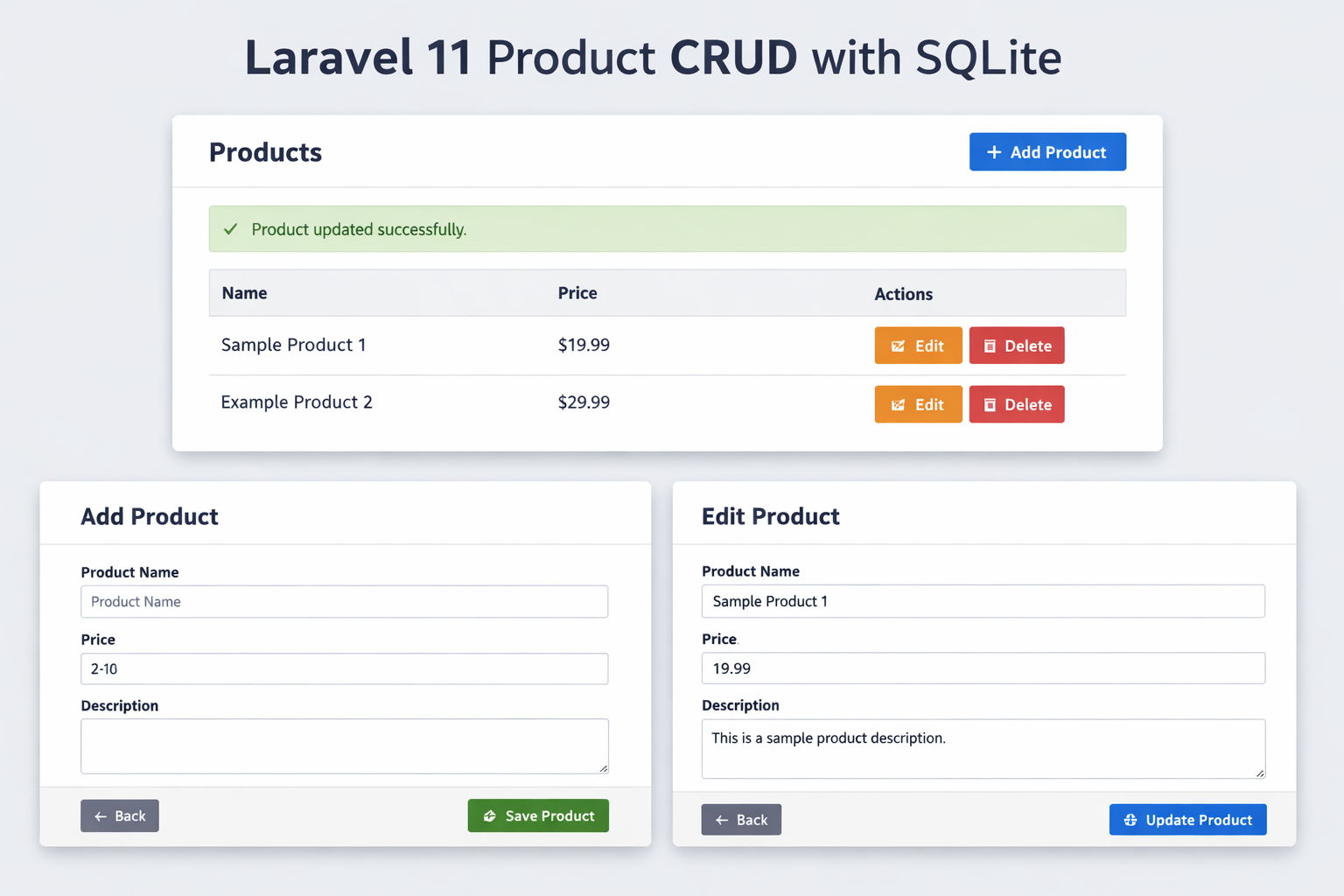
Final Output
You now have:
✔ Product Add
✔ Product View
✔ Product Edit
✔ Product Delete
✔ SQLite Database
✔ Laravel 11 MVC structure
Conclusion
This tutorial demonstrated how to build a complete Product CRUD system in Laravel 11 using SQLite, starting from installation to full functionality.